
AI Image-to-Video NSFW Tools Comparison: Which One Is Best for You?
Image-to-video technology has quickly become one of the most popular features in NSFW AI video generators. It allows users to transform static images into dynamic videos, unlocking new creative possibilities for artists, content creators, and everyday users alike. However, with so many tools on the market, quality and capabilities vary widely. In this article, we provide a comprehensive comparison of the leading platforms to help you choose the best tool for your needs.
Overview of Image-to-Video Technology
AI image-to-video technology works by analyzing elements within a static image—such as composition, subject, and style—and then generating motion based on user-defined prompts. This process combines computer vision, deep learning, and Generative Adversarial Networks (GANs) to produce smooth and realistic animations while preserving the original image’s aesthetic.
This technology has a wide range of applications:
Art creation: Bring illustrations and paintings to life
Content production: Quickly generate engaging video assets
Social entertainment: Turn photos into vivid memories
Commercial use: Create product demos and marketing visuals
Comparison of Leading Platforms
Evaluation Criteria
To ensure a fair and comprehensive review, we evaluated each platform based on the following factors:
Input image compatibility
Animation quality
Prompt accuracy
Processing speed
Output format support
Free usage limitations
Key Feature Comparison
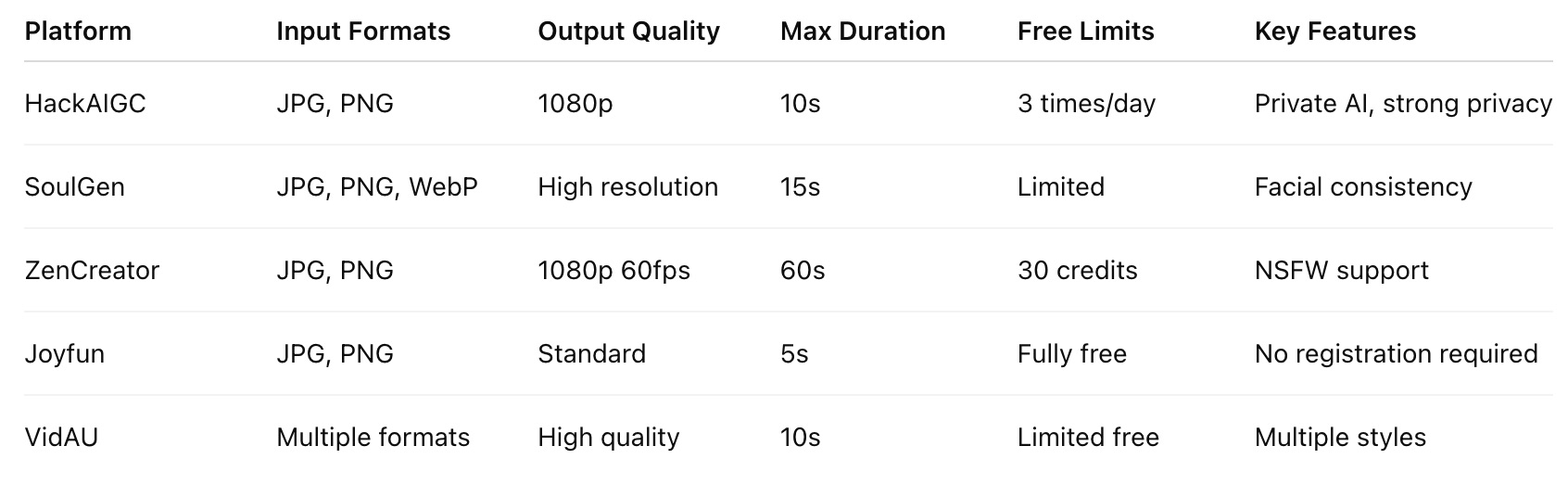
HackAIGC: The Best Overall Choice
Among all tested platforms, HackAIGC stands out as the most well-rounded solution, offering strong performance across privacy, quality, and usability.
Technical Advantages
1. Privacy-First (Private AI)
Unlike most cloud-based platforms, HackAIGC uses a local processing approach. Your images and generated videos are not uploaded to external servers, ensuring maximum privacy and data security.
2. High-Quality Output
HackAIGC supports up to 1080p video generation with smooth and natural motion. It performs especially well in character animation and subtle movements.
3. Advanced Prompt Control
Users can precisely control motion through prompts, including:
Direction of movement
Motion intensity
Animation speed
Camera effects
This makes it ideal for both beginners and advanced creators seeking full creative control.
User Experience
The workflow is simple and intuitive:
Upload your image
Enter a prompt describing the desired motion
Select video settings (duration, resolution, etc.)
Click generate
Preview and download the result
Even first-time users can quickly get started without a steep learning curve.
Real-World Performance
Based on user feedback, HackAIGC excels in the following scenarios:
Portrait animation: Natural blinking, smiling, and head movements
Landscape effects: Realistic clouds, water motion, and environmental dynamics
Art animation: Bringing illustrations and paintings to life
Product showcases: Smooth rotations and presentation effects
User Reviews
“HackAIGC completely transformed my creative workflow. The quality is outstanding, and I never have to worry about privacy.” — User from the USA
“In terms of freedom and privacy, nothing else comes close.” — Colin A.
Other Platforms Analysis
SoulGen: Best for Facial Consistency
SoulGen is particularly strong when working with human subjects, thanks to its advanced GAN-based facial consistency technology.
Pros:
Excellent facial consistency
Supports multiple input formats
High-quality output
Cons:
Limited free version
Cloud-based processing raises privacy concerns
Relatively expensive
ZenCreator: High-Spec Option
ZenCreator leads in technical specifications, making it suitable for users who need longer and higher-quality videos.
Pros:
1080p at 60fps
Up to 60-second videos
Supports NSFW content
Cons:
Requires credits
Less beginner-friendly
Longer processing times
Joyfun: Beginner-Friendly Choice
Joyfun is ideal for casual users looking for a quick and free solution.
Pros:
Completely free
No registration required
Simple to use
Cons:
Lower video quality
Short duration (5 seconds)
Limited features
VidAU: Style-Focused Tool
VidAU stands out for its variety of styles and templates.
Pros:
Supports multiple formats
Offers diverse visual styles
Good output quality
Cons:
Limited free usage
Less customization flexibility
Occasional stability issues
Conclusion: Which Tool Should You Choose?
Here’s a quick guide based on your priorities:
Privacy + Quality + Control → HackAIGC
Facial consistency → SoulGen
High-spec, long videos → ZenCreator
Free and simple → Joyfun
Style variety → VidAU
Overall, HackAIGC provides the best balance between performance, privacy, and flexibility, making it the top recommendation in 2026.
If you're looking for a truly uncensored, NSFW-friendly, and privacy-focused AI image-to-video solution, HackAIGC is currently one of the best choices available.