
How to Extend Videos With AI in 2026: Best Uncensored Tools, Use Cases, and Limits
If you want to extend a video with AI, the good news is that the tools are much better in 2026 than they were even a year ago. Modern AI video extension models can continue motion, lighting, framing, and scene direction far more smoothly than older generation tools.
The less obvious part is this: not every AI video extender is equally useful. Some tools are optimized for safe mainstream use cases and apply strict content filters. Others give creators more freedom, but the output quality, consistency, and workflow can vary a lot.
This guide explains how AI video extension works, when it performs well, where it still breaks, and which uncensored AI video tools are worth considering if you need fewer restrictions for creative work.
Key Takeaways
AI video extension means generating new frames that continue an existing clip.
The best results usually come from short, clean source clips with stable lighting and clear subject motion.
Many mainstream tools can extend videos, but some apply heavy moderation or content limits.
If you need more creative freedom, look for uncensored AI video extenders with stronger privacy controls and fewer arbitrary rejections.
For serious use, judge tools by motion consistency, subject stability, prompt control, render speed, and content policy — not marketing copy.
What Is AI Video Extension?
AI video extension is the process of taking an existing video clip and generating additional footage that continues it naturally.
Instead of simply looping frames or repeating the last seconds, an AI video extender tries to predict what should happen next based on:
subject motion
camera angle
lighting
scene composition
color and texture continuity
prompt instructions from the user
For example, if a clip ends with a person turning toward a window, the model may generate a continuation where the camera keeps moving, the subject finishes the motion, and the lighting shifts consistently with the scene.
That is the ideal outcome. In practice, the quality depends heavily on the tool, the source clip, and the complexity of the motion.
How AI Video Extension Works
Most AI video extension workflows follow the same basic pipeline:
Upload or generate a source clip You start with a video, usually a few seconds long.
Analyze the final frames The model studies motion direction, object position, lighting, depth, and composition.
Interpret the continuation prompt Some tools let you describe what should happen next, such as:
“the camera slowly pans left”
“she keeps walking toward the door”
“the scene becomes darker as neon lights appear”
Generate continuation frames The model creates new frames intended to match the original clip.
Blend for continuity Better tools try to preserve subject identity, motion logic, and visual style across the transition.
In strong cases, the result feels like a natural continuation. In weak cases, you get drift, warped anatomy, unstable backgrounds, or sudden motion that does not match the original clip.
When AI Video Extension Works Best
AI video extension is most reliable when the source clip has:
clear subject focus
moderate motion
stable framing
consistent lighting
clean edges and limited scene clutter
It usually works well for:
slow cinematic shots
portrait clips
stylized character scenes
simple action with one main subject
controlled camera movement
It is more likely to fail on:
chaotic multi-person scenes
fast action
extreme camera shake
complex hand interactions
crowded backgrounds
heavy occlusion
sudden perspective changes
If you want better outputs, start with a clip that already looks clean and coherent before asking the AI to continue it.
Why People Search for Uncensored AI Video Extenders
A lot of creators are not just searching for “video extension.” They are searching for uncensored AI video extenders because many mainstream tools reject prompts or footage that fall outside conservative content policies.
That affects more than adult content. It can also affect:
artistic nudity
fashion and body-focused shoots
horror scenes
darker cinematic narratives
fetish-coded styling
experimental visual work
edge-case editorial content
In other words, “uncensored” often means fewer arbitrary content blocks, not just “anything goes.”
For creators, the practical issue is workflow reliability. If a tool rejects valid creative work halfway through production, it becomes hard to use professionally.
What Makes an AI Video Extender Actually Good?
A strong AI video extension tool should be judged on output quality, not just feature lists.
Here are the five metrics that matter most:
1. Motion continuity
Does movement continue naturally, or does it snap, reset, or drift?
2. Subject consistency
Does the person, face, body, clothing, or object remain stable across the extension?
3. Camera logic
Does the continuation respect the original angle, zoom, and movement?
4. Prompt responsiveness
Can you meaningfully guide what happens next, or are prompts mostly ignored?
5. Policy reliability
Can you actually finish the job without the platform rejecting your work unexpectedly?
A tool that looks impressive in demos but fails one of these consistently is not a serious production option.
Mainstream AI Video Tools vs Uncensored Options
There are two broad categories in the market.
Mainstream platforms
These usually offer:
polished UI
predictable onboarding
safer brand positioning
broad appeal
But they often come with:
stricter moderation
limited edge-case flexibility
more rejected generations
reduced usefulness for creators working outside mainstream content boundaries
Uncensored or lower-restriction platforms
These usually appeal to users who need:
fewer prompt restrictions
more freedom in subject matter
private creation flows
less interference during generation
But the tradeoff can be:
less polished interfaces
more variation in output quality
weaker documentation
inconsistent render speed depending on infrastructure
The best choice depends on whether your top priority is policy safety, creative freedom, privacy, or production consistency.
Where HackAIGC Fits
HackAIGC is relevant here because it is designed for users who want AI image, chat, and video generation with fewer restrictions than typical mainstream tools.
For video-related workflows, the main value is not just “uncensored” positioning. It is that the platform gives creators a place to work without constantly redesigning prompts to avoid arbitrary content rejections.
That matters if your workflow includes:
NSFW or adult-oriented creative work
stylized or edgy visual concepts
repeated generation and iteration
privacy-sensitive projects
experimentation across image, chat, and video in one environment
A useful positioning for this page is not “HackAIGC can do everything better than everyone.” A better and more credible claim is:
HackAIGC is a practical option for creators who need more freedom, a simpler uncensored workflow, and an integrated environment for AI-assisted visual creation.
That is a much stronger and more believable message.
Best Practices for Extending Videos With AI
If your goal is better outputs, these practices matter more than long prompts.
Start with a strong source clip
Your first 3 to 8 seconds determine most of the result quality. Clean input beats clever prompting.
Extend in short steps
It is usually safer to extend a clip in smaller increments than ask for one long continuation.
Keep motion simple
AI handles steady motion better than abrupt action.
Be specific with prompts
Instead of:
“continue the scene”
Use:
“the subject keeps walking forward as the camera slowly pushes in”
“the hair moves gently in the wind while the background lights remain soft and blurred”
Review frame transitions
Do not judge only by the final render. Check the join point between original and generated footage.
Expect some failure rate
Even good tools fail sometimes. Treat AI video extension as an iterative workflow, not a one-click guarantee.
Common Problems With AI Video Extension
Even the best tools still struggle with a few recurring issues:
Character drift
The face, body, or clothing slowly changes across frames.
Motion mismatch
The continuation does not respect the direction or speed of the original clip.
Background instability
Walls, lights, or objects morph unexpectedly.
Physics errors
Hands, limbs, hair, and object interactions can become unrealistic.
Prompt overcorrection
The model follows the continuation prompt too aggressively and loses scene consistency.
If a platform handles these badly, it does not matter how strong the marketing page looks.
How to Choose the Right Tool
Use this checklist before committing to a workflow:
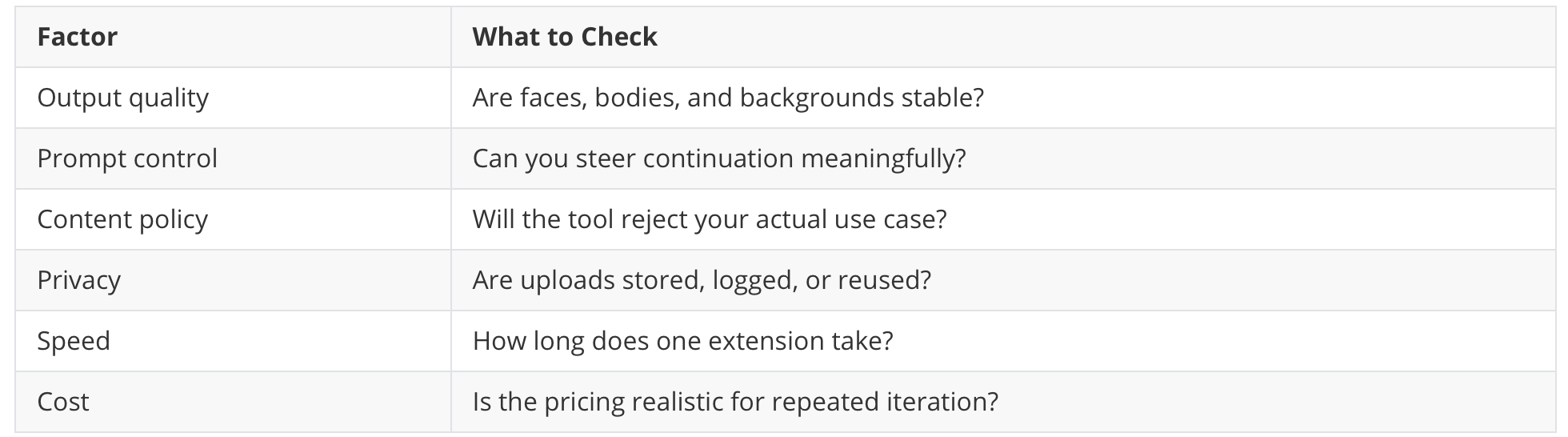
If you are working on sensitive or adult content, policy reliability matters almost as much as quality.
Who This Type of Tool Is Best For
AI video extension with fewer restrictions is especially useful for:
adult creators
stylized video artists
experimental filmmakers
character-content creators
NSFW visual workflow users
creators testing concept sequences before full production
It is less useful if you only need basic social clips and are already satisfied with a mainstream editing stack.
FAQ
What is the best AI video extender in 2026?
The answer depends on what you need. If you care most about mainstream safety and polished UI, mainstream tools may be enough. If you need fewer content restrictions and more creative flexibility, uncensored AI video extenders are usually the better fit.
Can AI extend a video naturally?
Yes, sometimes very well. The best results happen with short, clean clips, stable motion, and a realistic continuation prompt. Complex scenes still break easily.
What does “uncensored AI video extender” mean?
Usually it means the tool has fewer automated content restrictions and is less likely to reject edge-case, adult, artistic, or mature visual work.
Are uncensored AI video tools better?
Not automatically. Some offer more freedom but worse output quality. The best tools balance freedom, consistency, privacy, and render reliability.
Is AI video extension good enough for professional use?
For concept development, creative iteration, and some production workflows, yes. For critical scenes, most users still need review, multiple attempts, and post-editing.
Final Thoughts
AI video extension is finally becoming useful enough for real creative workflows, but the gap between marketing and actual output is still large.
If you just want a polished demo, almost any tool can look impressive. If you need a tool that you can actually use repeatedly — especially for sensitive, edgy, or unrestricted creative work — you should care about three things above all:
consistency
prompt control
policy reliability
That is why creators are increasingly comparing uncensored AI video extenders, not just mainstream video tools.
If your workflow depends on fewer restrictions and more private experimentation, HackAIGC is worth evaluating as part of that shortlist.